![dineplan_horizontal_dp_blue-1.svg]](https://learn.dineplan.com/hubfs/dineplan_horizontal_dp_blue-1.svg)
You may need to process a refund for one of your guests for the following reasons:
-
A guest cancels their booking within your cancellation policy timeframe
-
The deposit was not deducted from the guest's bill
-
There is a leftover amount of the deposit after the bill has been settled
In these instances, a refund will need to be actioned manually by the restaurant. This is not done automatically , as each restaurant has its own internal processes and policies for managing refunds, and Dineplan is not authorised to handle this on a restaurant’s behalf.
When a guest cancels their reservation, a cancellation notification email is sent to the restaurant. This email will indicate whether a payment is on the booking, and it includes a link that takes you directly to the reservation so you can process a refund if needed. It’s very important to process refunds promptly when guests cancel.
Credit Card Refunds:
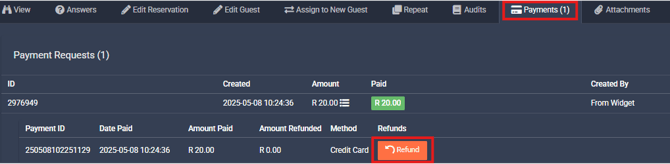
Credit card payments can be refunded directly from the Payments tab within a reservation.
-
Log into Dineplan with a user profile that has the "Refund Ability" permission.
-
From your Reservations Dashboard, locate the guest’s reservation on the relevant date and time.
-
If the booking is still active, select the pencil icon
 to Edit the booking.
 -
If the booking is cancelled, select the "eye" icon
 to View Cancelled Booking.
 -
Once inside the booking, go to the Payments tab.
-
Click the orange Refund button next to the payment you’d like to refund.
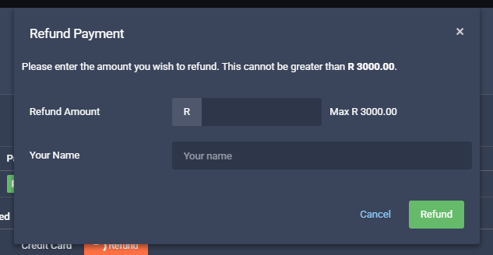
- A window will open where you can enter the refund amount. Fill in the amount to be refunded, add your name, and click the green Refund button to complete the process.
-
Once completed, the orange refund button will update to show the refunded amount, along with the date and time it was processed, and the name of the person who initiated it.
- No further action is required, the refund will now be processed between Dineplan’s bank and the guest’s bank.
Please note the following with regards to refunds:
-
The refund transaction will appear as “Dineplan” on the guest’s bank statement.
-
As the refund is processed as a reversal of the original payment, it may reflect the original payment date, so the guest should check their bank statement from that date onwards.
-
Refunds to South African cards usually take around 3 business days to reflect, but can take up to 10 business days, depending on the bank.
-
Refunds to international cards may take up to 14 business days to reflect, depending on the country and the guest’s bank.
Proof of Refund for Credit Card:
If you process a refund for a guest and they need proof of the refund to track the funds returning to their account, you’re welcome to email support@dineplan.com. A member of the Support team can assist with this.
Please ensure you include the guest’s name along with the booking details or payment ID when sending your request. This will help us locate the correct transaction quickly.
If the processing time has passed and the cardholder is still unable to trace the refund, they can forward the proof of refund to their bank, who will be able to advise where the refund is reflecting.
EFT Refunds:
If a guest has made payment by EFT, you will not see the orange refund button available in the Payments tab. You can only refund these payments by doing a manual EFT back to the guest.
You will need to request the guest’s banking details and then share them with the person who normally manages your financial queries so that they can process an EFT refund to the guest.
The EFT deposit on the booking will be released for payment to the restaurant as usual, on the first business day after the reservation date.
Refund Issues:
-
If you encounter an error message when trying to process a credit card refund for a guest, please take a screenshot of the error and email it to support@dineplan.com. This will allow us to investigate the issue and advise on the next steps.
-
If a guest has made an EFT payment that is not showing on their booking and you need to refund them, please ask the guest to provide their proof of payment and send it to support@dineplan.com. We can then locate the payment and manually allocate it if it has been received.
If you have any questions or need help regarding refunds, please get in touch with us.