![dineplan_horizontal_dp_blue-1.svg]](https://learn.dineplan.com/hubfs/dineplan_horizontal_dp_blue-1.svg)
The process you need to follow will depend on your payment arrangement and the permissions available on your user profile:
If your account is on debit order, you can purchase and load credits instantly:
The steps to complete the top-up are as follows:
- Log in to your Dineplan account and click on the SMS credits display located in the top right corner of your screen.
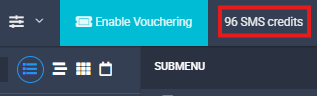
- Alternatively, you can go to the Settings tab from the menu bar on the left of the screen and then select SMS Settings from the sub-menu on the right.
-
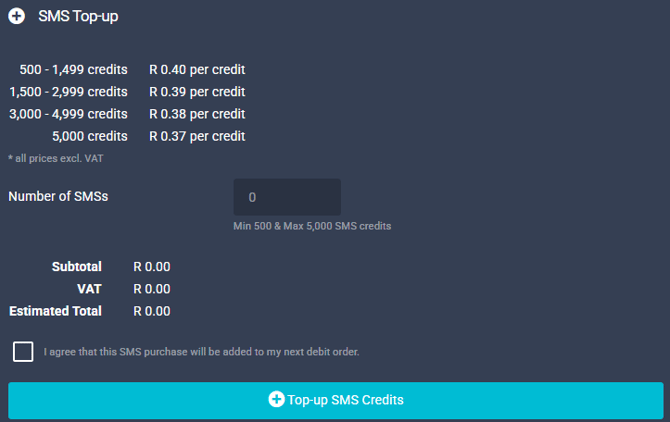
On the next screen, enter the number of credits you would like to purchase. The estimated cost will update automatically to show the total price of the bundle.
-
Once you're happy to proceed, tick the checkbox at the bottom of the page to agree that the invoice that will be generated will be included with your next debit order.
- Click on the blue Top-Up button at the bottom to complete the purchase.
- The credits will be loaded to your account instantly, and the invoice for the purchase will be included in your next debit order. A download link for the invoice will also be available.
Important: Your user profile must have the required permissions to access and top up message credits on the account. If you do not have access to these options, you will need to ask an admin user on the account to assist with the purchase.
Alternatively, you can contact us at support@dineplan.com and we'll be happy to assist further.
If your account is not on debit order, you will need to generate and download an invoice. The invoice will need to be paid first before the credits can be manually loaded.
To generate and download an invoice, follow these steps:
- Log in to your Dineplan account and click on the SMS credits display located in the top right corner of your screen.
-
Alternatively, you can go to the Settings tab from the menu bar on the left of the screen and then select SMS Settings from the sub-menu on the right.
-
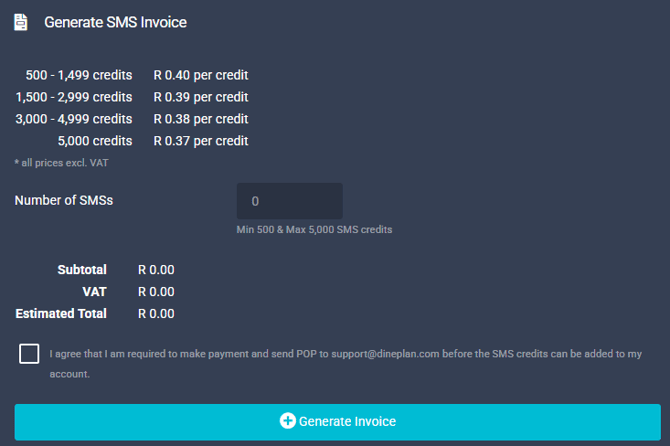
On the next screen, enter the number of credits you would like to purchase. The estimated cost will update automatically to show the total price of the bundle.
-
Once you're happy to proceed, tick the checkbox to acknowledge that you understand you need to send support@dineplan.com a proof of payment before credits can be loaded.
- Click on the blue Generate Invoice button at the bottom for the invoice to be created
-
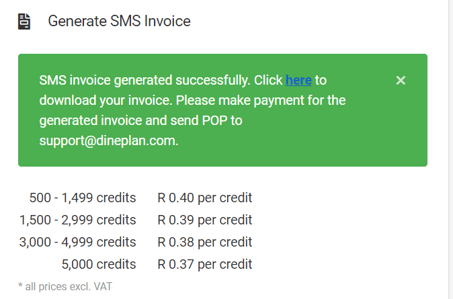
A green confirmation banner will appear to let you know that the invoice has been generated successfully. The banner will also include a link where you can view and download the invoice -
-
Provide the invoice to the relevant person who can make the payment for the invoice. Once the payment has been completed, forward the proof of payment to support@dineplan.com so that we can manually load the credit bundle to your Dineplan account.
- We will confirm once this has been completed.
Important: Your user profile must have the required permissions to access and generate an invoice for message credits from your account. If you do not have access to these options, you will need to ask an admin user on the account to assist with creating the invoice.
Alternatively, you can contact us at support@dineplan.com and we'll be happy to assist further.
If you don't have access or you need more than 5000 credits:
- Send an email to support@dineplan.com and let us know how many credits you would like to purchase.
- We'll create an invoice for you.
- If you're on debit order, we'll load these credits instantly to your Dineplan account and send the invoice for your records.
- If you're not on debit order, we'll forward the invoice for you to complete the payment first. As soon as the proof of payment is sent back to us, we'll load the credits to your Dineplan account.
Message Bundle Prices:
| 500 credits | R200 (R230 incl VAT) | (R0.40 per credit) |
| 1500 credits | R585 (R672.75 incl VAT) | (R0.39 per credit) |
| 3000 credits | R1140 (R1311 incl VAT) | (R0.38 per credit) |
| 5000 credits | R1850 (R2127.50 incl VAT) | (R0.37 per credit) |
| 12000 credits | R4200 (R4830 incl VAT) | (R0.35 per credit) |
| 24000 credits | R7920 (R9108 incl VAT) | (R0.33 per credit) |